Search is changing faster than most marketers expected. It’s no longer just about ranking on Google now; tools like ChatGPT are directly answering user questions, often without users ever clicking through to a website.
That raises a critical question:
Is your website actually showing up in ChatGPT answers?
If you’re investing in SEO but ignoring AI visibility, you’re missing a growing share of traffic. In this guide, you’ll learn exactly how to check whether your website appears in ChatGPT responses, how to measure AI-driven traffic, and what to do if you’re not showing up yet.
What Does It Mean to “Appear in ChatGPT Answers”?
Before checking anything, it’s important to understand what “appearing” really means.
Unlike traditional search engines, ChatGPT doesn’t always show a list of links. Instead, it:
- Summarizes information from multiple sources
- Mentions brand names or websites
- Sometimes includes citations or references
- Provides answers without visible links
So your website might be:
- Directly cited (with a link or reference)
- Indirectly used (content influences answers but isn’t credited)
- Completely absent
Your goal is to identify which of these applies to your site.
Why This Matters More Than Ever?
AI search is quickly becoming a major traffic channel. Users now ask questions like:
- “Best SEO tools for beginners”
- “How to build backlinks in 2026”
- “Top video marketing agencies”
Instead of browsing 10 results, they get one summarized answer.
If your website is part of that answer:
- You gain authority
- You get referral traffic
- Your brand visibility increases
If not, your competitors will take that space.
How to Check if Your Website Appears in ChatGPT Answers?
Step 1: Manually Search Your Target Queries in ChatGPT
The simplest way to start is also the most overlooked.
Open ChatGPT and search for queries related to your niche:
- Your primary keywords
- Long-tail variations
- Question-based queries
Example:
If your site is about SEO, try:
- “How to build backlinks safely in 2026”
- “Best link building agencies”
- “How to improve domain authority”
What to Look For:
- Does your brand name appear?
- Is your website referenced?
- Are competitors mentioned instead?
Repeat this across multiple queries to identify patterns.
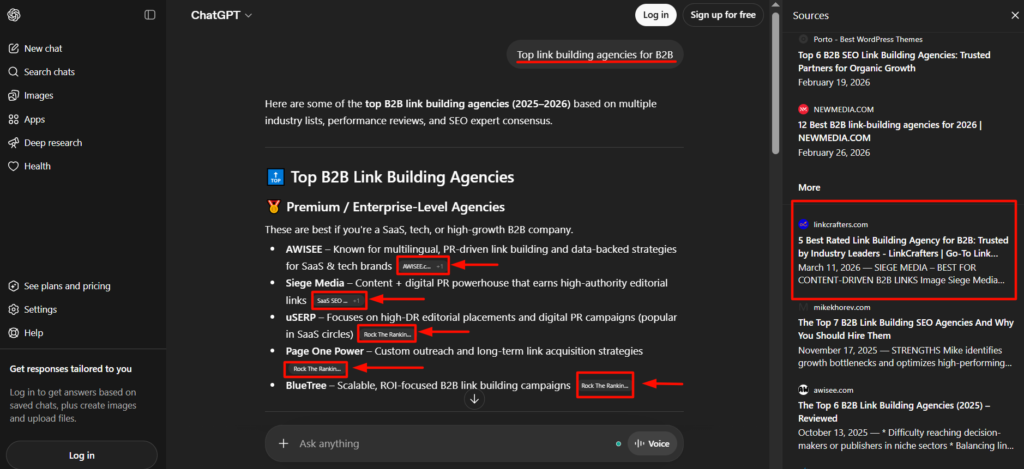
We’ve written a listicle on the topic “Best link agencies for B2B.” When we manually search one of our secondary keywords on ChatGPT. ChatGPT is deaturing our blog post in its sources.
Step 2: Track Referral Traffic from AI Platforms
| Platform | Type of Traffic | How to Track in GA4 |
| ChatGPT | Referral / indirect | chat.openai.com |
| Bing AI | Search + AI | bing.com |
| Perplexity AI | Referral | perplexity.ai |
| Google AI | Search (blended) | google / organic |
One of the most reliable ways to check if ChatGPT is sending traffic is through analytics.
In Google Analytics (GA4), check:
- Acquisition → Traffic Acquisition
- Look for referral sources like:
- chat.openai.com
- bing.com (AI-powered results)
- perplexity.ai
What This Tells You:
- If you’re getting traffic → you’re being referenced somewhere
- If traffic is growing → your AI visibility is improving
Even small numbers matter right now. AI traffic is still in its early stages, but growing fast.
Step 3: Use “Prompt Testing” to Simulate User Behavior
This is where most people go wrong—they test only one query and assume results are fixed.
ChatGPT responses vary based on how users phrase questions.
Try Different Prompt Styles:
Instead of:
“Best SEO agency”
Also test:
- “What are the most trusted SEO agencies in 2026?”
- “Which companies provide high-quality backlinks?”
- “Top link building services for startups”
Why This Works:
AI models respond differently to:
- Tone
- Intent
- Context
You might appear in one variation but not another.
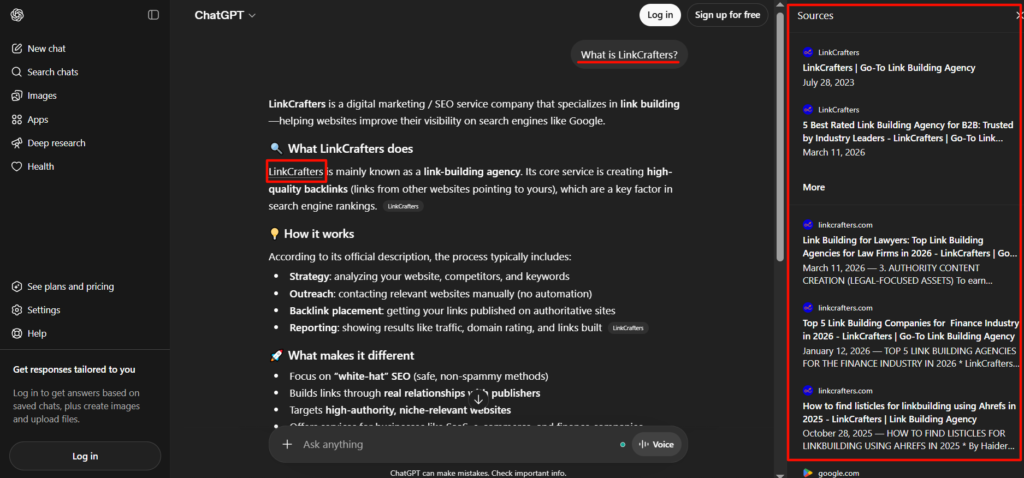
Step 4: Check Brand Mentions (Even Without Links)
Sometimes ChatGPT mentions your brand without linking to your website.
Search for:
- Your brand name
- Your product/service names
Example:
“What is LinkCrafters?”
“Is LinkCrafters a good link building service?”
If your brand appears in responses, that’s a strong signal that:
- Your content is being indexed by AI systems
- You’re building authority in your niche
Step 5: Analyze Competitors Showing Up in AI Answers
If you’re not appearing, your competitors probably are.
Search your target keywords and note:
- Which brands are mentioned repeatedly
- What type of content they publish
- Their positioning (tools, agencies, guides)
Look for Patterns:
Do they have:
- In-depth guides?
- Data-driven content?
- Strong backlinks?
- Clear brand positioning?
This gives you a blueprint for improving your own visibility.
Step 6: Look for Indirect Signals (Hidden Influence)
Even if ChatGPT doesn’t mention your site directly, your content might still be influencing answers.
Signs of Indirect Visibility:
- Your ideas or frameworks appear in answers
- Your statistics are used (without attribution)
- Your content structure is mirrored
This means you’re on the right track but need stronger domain authority to get credited.
Common Reasons Your Website Isn’t Appearing
If you’re not showing up yet, here’s why:
1. Low Authority
AI models prefer trusted, authoritative sources.
2. Thin Content
Short or generic articles rarely get picked up.
3. Lack of Backlinks
Backlinks still play a major role in content credibility.
4. Poor Structure
Unclear formatting makes it harder for AI to extract information.
5. No Brand Recognition
If your brand isn’t mentioned online, AI won’t surface it.
How to Improve Your Chances of Appearing in ChatGPT Answers
Now that you know how to check visibility, here’s how to improve it.
1. Focus on Topical Authority
Cover your niche deeply instead of writing random posts.
2. Create “AI-Friendly” Content
Write content that:
- Directly answers questions
- Uses clear headings
- Includes concise explanations
3. Build High-Quality Backlinks
Backlinks signal trust, not just to Google, but to AI systems too.
4. Optimize for Questions
Target queries like:
- “How to…”
- “What is…”
- “Best tools for…”
5. Strengthen Your Brand Presence
Get mentioned on:
- Blogs
- Directories
- Industry websites
How LinkCrafters Helps You Appear in AI Search
If you want to show up in ChatGPT answers, backlinks, and authority are no longer optional; they’re essential.
LinkCrafters helps brands build exactly that.
We focus on:
- High-authority, niche-relevant backlinks
- White hat link building strategies
- Content that ranks in both Google and AI search
As AI systems increasingly rely on trusted sources, strong backlinks directly improve your chances of being referenced.
If your goal is to appear in ChatGPT answers and AI search results, building authority is the fastest path, and that’s exactly what we help you achieve. Contact us today to start your link-building journey.
Final Thoughts
Checking whether your website appears in ChatGPT answers isn’t a one-time task; it’s an ongoing process.
AI search is still evolving, but one thing is clear:
The websites that build authority, publish high-quality content, and earn trust will dominate both traditional and AI search.Start by testing your visibility, track your traffic, analyze competitors, and refine your strategy.
The earlier you adapt, the bigger your advantage.
FAQs
How do I know if ChatGPT is using my website?
You can check by searching your target queries in ChatGPT, monitoring referral traffic in analytics, and looking for brand mentions in responses.
Does ChatGPT show website links?
Sometimes. It may include citations or references, but often it summarizes information without linking directly.
Can I track ChatGPT traffic in Google Analytics?
Yes. Look for referral sources like “chat.openai.com” or other AI platforms under traffic acquisition reports.
Why is my website not appearing in ChatGPT answers?
Common reasons include low authority, weak backlinks, thin content, and lack of brand recognition.
How long does it take to appear in AI search results?
It depends on your authority and content quality. With consistent SEO and backlink building, improvements can be seen within a few months.